
Follow this guide to set up your new TX Gear Grid Chat
- Unzip the gridchat file and open gridchat.php with Notepad or other text editor. Find this line, should be line 33. if ($key != "YOUR_SECRET_PASS_HERE") { die(); } /* Set this to the same Secret Key as in your chat servers Logger Settings Notecard */
- Where it says YOUR_SECRET_PASS_HERE create your own Secret Key. Do not share it with anyone.
- Now go the contents of your Chat server in world and open the Logger Settings notecard. On the last line, after Secret Key= put your secret key. Save the notecard.
- Now, upload the gridchat folder, to your web host inside your public_html directory. Now it should be located at http://yourwebsite.com/gridchat (yourwebsite.com being your websites address).
- Now, in the Logger Settings notecard inside your chat server find Logger Location= and put the location of your gridchat.php file as mentioned in step 4.
- Now find Chat Location= in the notecard and put the location of the web chat which will be similar, http://yourwebsite.com/index.html note, this is the index file, not the php file we used before. We can ignore the rest of that notecard for now, so just save and close it.
- Next, go to http://tx-gear.com/dns/dns_generate.php and click the Generate button. It will generate a uuid, copy and paste this and put it in the description field of your Chat Server.
- Reset the chat server using your build menu, or re-rez it. In Local Chat it will spit out another uuid. Put this uuid in the description of your Grid Chat HUD and re rez it.
- Open the Grid Chat HUD and then the Chatter Settings notecard in it. Find Chat Location= and put the same address we used in the chat server notecard. ie: http://yourwebsite.com/index.html You may also re rez it.
Thats all there is to it. You can set whatever perms you want on your Grid Chat HUD and distribute it to those you wish to chat with, Grid wide.
Additional Info:
Additional Chat Server notecard settings:
# chat server default state after sim restarts 0 is off, 1 is on
# chat server default state after sim restarts 0 is off, 1 is on
Logger Default State=1
Auto Clear chat log on server at sim restarts (Keeps the log file minty)
Auto Clear Sim Restart=1
open relay chat from other items (such as TX Destinations HUD) 0 is off, 1 is on
Open Relay=1
open relay chat channel for other items (such as TX Destinations HUD)
Open Chat Channel=-96
Notes: Open Relay must be on, 1 to use Auto Announcer. Also a good idea to clear the chat log to keep the log file from getting too big, so we have made it so it will clear automatically on sim restarts (weekly) as long as that is set to 1.
Additional Chat HUD notecard settings:
Message wearer sees when they click the logo
#
Logo Click Text=TX Gear your complete one stop full permission vehicle builder shop, featuring over 1700 full perms shells, hundreds of parts, REC Basic vehicle scripts and much much more. Built by a Builder, for Builders. Dont forget to Join Our Group for updates and Freebies and Help! [secondlife:///app/group/75e2dd9d-2be0-efa6-c78e-48fb4534d173/about TX Gear Gearheads]
#
Owner only = 1, Open Chat = 0
Owner Only=1
#
HUD Positioning (and repositioning)
Open Pos=<0.00000, -0.398, -0.084>
Hid Pos=<0.00000, 0.362, -0.084>
NOTE: AS of V2 Domain and Key go at the top of the HUD notecard.
ie:
ie:
Domain=http://yourdomaincom
Public Key=cef0b4a9-dbb3-49fd-c440-b96a79e61a4a (generated by the Chat server)
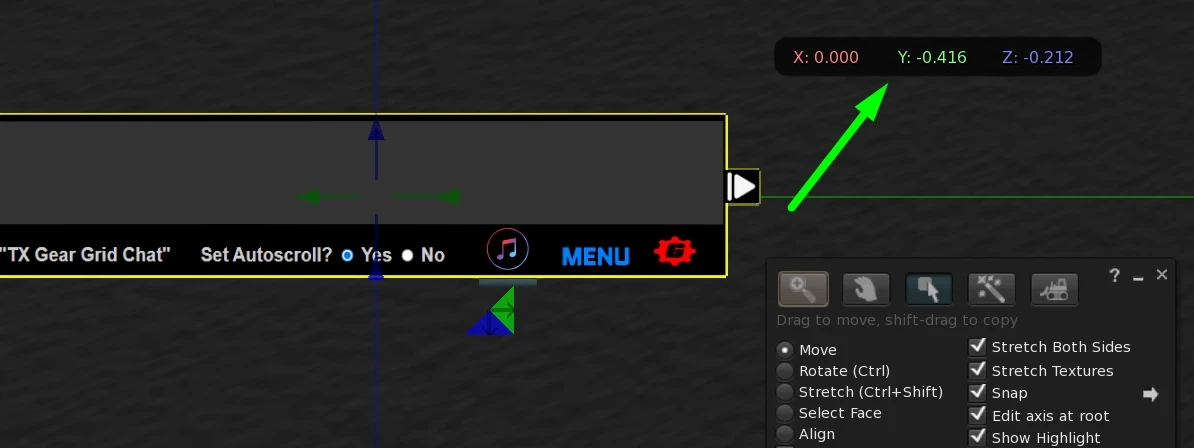
These are pretty self explanatory. Default attach position is top left - but it can be changed by simply repositioning it manually and copying the values you see in your viewer to the notecard.
These are pretty self explanatory. Default attach position is top left - but it can be changed by simply repositioning it manually and copying the values you see in your viewer to the notecard.
Getting position values to move HUD screen position.
Using Auto Announcer:
Auto Announcer is great if you want to stream ads for your business or club announcements directly into your chat stream. Its configuration is pretty simple.
In the Announcer description field you will see 120:-96
In the Announcer description field you will see 120:-96
120 is the seconds between announcements and -96 is the channel used by your Chat Server when Relay is on.
Then, just fill out the notecard in the Announcer, one line per announcement. Click to turn it on or off.
Radio on HUD:
Edit Linked the Radio button on the HUD to change the streams available in the radio. Note: If worn by someone with Land rights, it can be used to change the land stream.
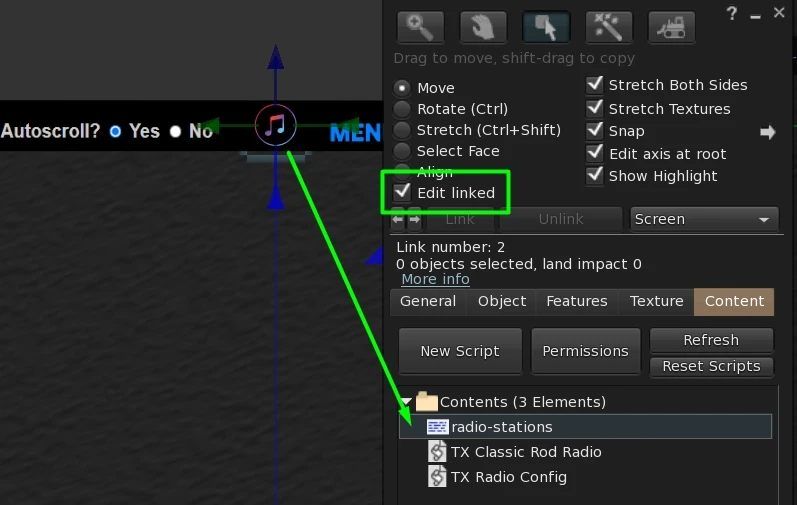
Edit radio stations.